
12 min read
Oct 15, 2024
PlantIn App Review
We’ve all been there — excitedly bringing home a new houseplant, only to find it drooping or turning brown within weeks.
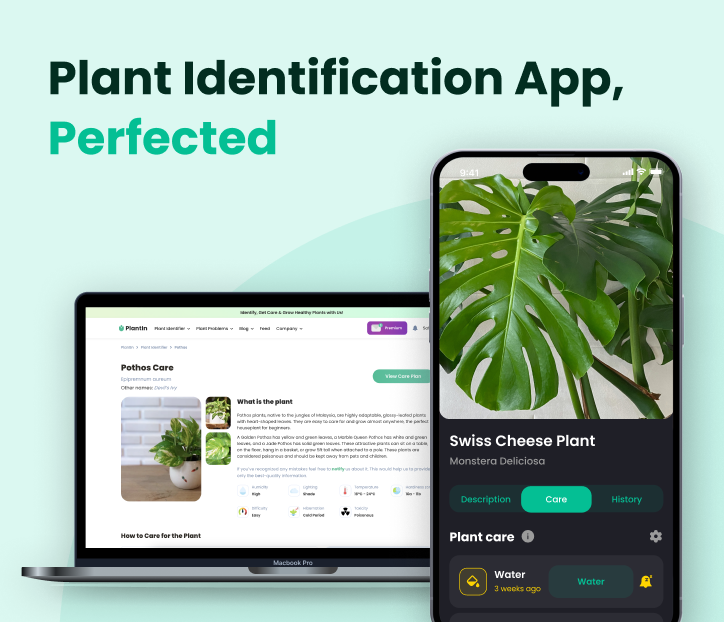
Maybe it’s overwatering, or the sunlight isn’t quite right? The truth is that plant care can be confusing. Even experienced plant parents face difficulties when dealing with new species or diseases, and it’s easy to feel like you’re doing more harm than good.
Therefore, when problems arise, it’s crucial to have the right tools at your disposal. Whether you need help diagnosing an issue, finding care tips, or tracking your greenie’s progress, there are several options available to guide you.
Therefore, when problems arise, it’s crucial to have the right tools at your disposal. Whether you need help diagnosing an issue, finding care tips, or tracking your greenie’s progress, there are several options available to guide you.
et’s dive deeper and learn more about PlantIn — a tool already trusted by millions of plant parents worldwide. It has saved and boosted the growth of many millions of leafy companions, with more and more users joining every day to help save, recover, and care for their plants.
Available for both Android and Apple devices, PlantIn also offers a web version — no download needed — giving you full access to its features anytime, anywhere. For many, it has become the go-to solution for everything from diagnosing plant problems to keeping their green spaces thriving.
Available for both Android and Apple devices, PlantIn also offers a web version — no download needed — giving you full access to its features anytime, anywhere. For many, it has become the go-to solution for everything from diagnosing plant problems to keeping their green spaces thriving.
Here’s a 10-second PlantIn summary before we get started:
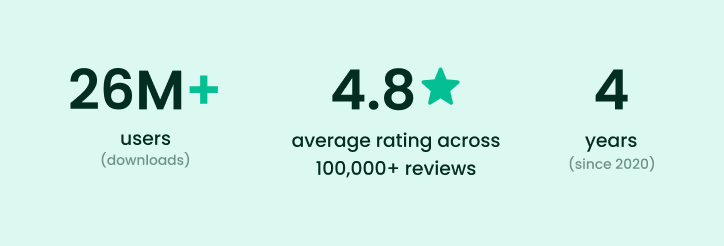
Millions of active users around the globe.
There are over 17,000 plants in the database with detailed background information on each species.
95,8% accuracy in plant identification through AI-powered algorithms.
More than 7 million plants were diagnosed and saved.
Web version available for users who prefer desktop or laptop access.
Fascinating, isn’t it? Read on to find out the reason behind such success!
There are over 17,000 plants in the database with detailed background information on each species.
95,8% accuracy in plant identification through AI-powered algorithms.
More than 7 million plants were diagnosed and saved.
Web version available for users who prefer desktop or laptop access.
Fascinating, isn’t it? Read on to find out the reason behind such success!
Plant Identification
Ever seen a beautiful flower wondering what it’s called? Or perhaps stumbled upon some mushrooms, unsure if they’re worth gathering? That’s a job right up PlantIn’s alley! The app uses image processing technology for analyzing such characteristics as leaves, stems, and even flowers, to help you identify that mysterious greenery. With an impressive accuracy rate of 95,8%, you may be wondering how that is possible. The answer: cutting-edge technology. PlantIn has an original machine-learning model that keeps improving based on user feedback. Not only that, but it also has an extensive dataset to ensure precision.
Fun fact:
PlantIn has already helped identify over 44 million plants!
Here’s how it works:
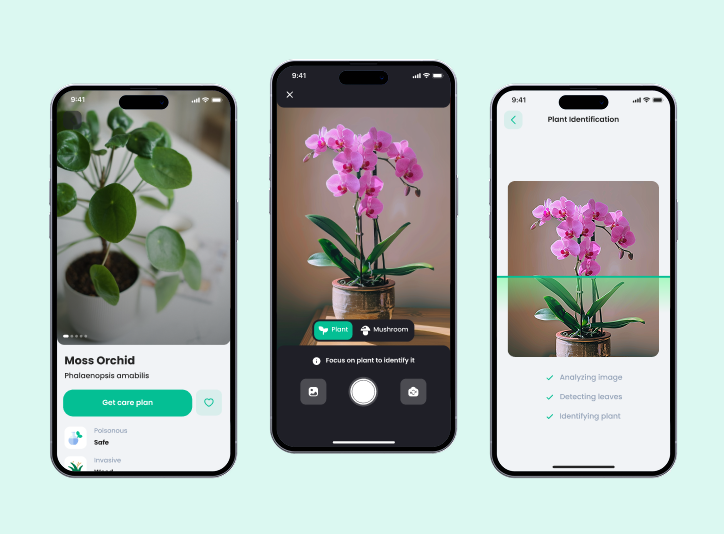
First, upload or snap a photo of the plant in question. Follow the Snap tips for better results. However, there’s also an alternative way — PlantIn’s innovative AR mode! Just point your camera around and identify the surrounding flora in real time.
Once the picture is submitted, the app’s scanner proceeds to identify the species. The algorithm involves processes like leaf analysis to distinguish all the characteristics. While this sounds complicated, plant identification takes mere seconds.
After the recognition process, you’ll be redirected to your plant’s profile, where you can find its pictures, common and scientific name, detailed care instructions, and common diseases and pests. PlantIn’s mobile app and website boast an extensive species database, and you’ll definitely find what you’re looking for among the +17,000 available plants. However, if the greenery is missing, don’t panic. Just send a request, and PlantIn’s team will add the species in their future updates.
Once the picture is submitted, the app’s scanner proceeds to identify the species. The algorithm involves processes like leaf analysis to distinguish all the characteristics. While this sounds complicated, plant identification takes mere seconds.
After the recognition process, you’ll be redirected to your plant’s profile, where you can find its pictures, common and scientific name, detailed care instructions, and common diseases and pests. PlantIn’s mobile app and website boast an extensive species database, and you’ll definitely find what you’re looking for among the +17,000 available plants. However, if the greenery is missing, don’t panic. Just send a request, and PlantIn’s team will add the species in their future updates.
Plant Care Tips
Identifying a plant is one thing; keeping it alive and thriving is another. Of course, PlantIn’s here to help, providing tailored care tips for your leafy friends. In order to create a precise plant care schedule, the app considers over sixteen different characteristics, including light conditions, hemisphere, pot size, soil, and much more.
Once you’ve identified your first plant (or simply found it in the database), the next step is to add it to your space. Simply tap the “Save to My Plants” button, and you’re ready to start your plant care journey. First of all, PlantIn provides all the information about the species’ preferences, so make the necessary adjustments in the plant’s placement, soil, and so on. Next, add some basic information about your new green companion so that the app can provide an improved care plan. After that, you can set up a routine. Here are the primary care tasks you can keep track of in PlantIn:
Watering
Misting
Fertilization
Pruning
Repotting reminders
Once you’ve identified your first plant (or simply found it in the database), the next step is to add it to your space. Simply tap the “Save to My Plants” button, and you’re ready to start your plant care journey. First of all, PlantIn provides all the information about the species’ preferences, so make the necessary adjustments in the plant’s placement, soil, and so on. Next, add some basic information about your new green companion so that the app can provide an improved care plan. After that, you can set up a routine. Here are the primary care tasks you can keep track of in PlantIn:
Watering
Misting
Fertilization
Pruning
Repotting reminders
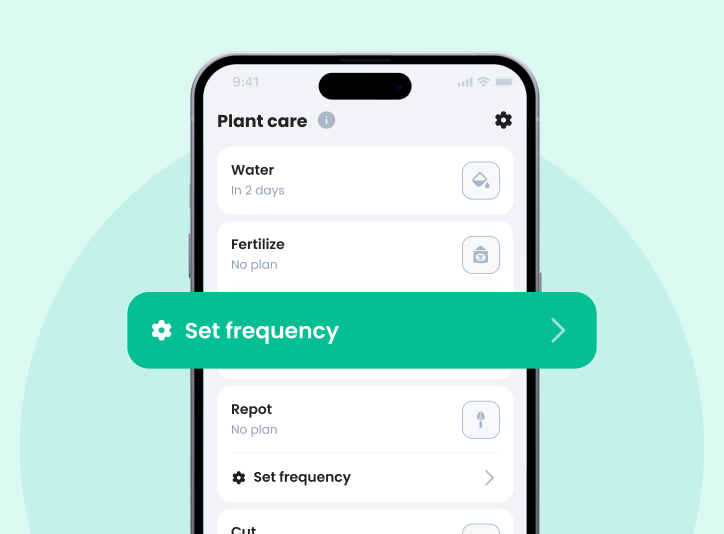
Everything is customizable: you can set the frequency of each task, snooze unwanted notifications, and leave notes about your routine. Say, you want to receive watering reminders each Friday after 8 PM, but turn off completely other tasks like repotting reminders. That’s completely doable! It’s your routine, so customize it to your preferences. The same goes for all other in-app notifications as well, so no more intrusive pushes all day long! Some other customization options you might be interested in include:
Creating several plant spaces (for example, for different rooms).
Changing your plants’ names and adding their pictures.
The customization pack allows you to modify the design’s appearance (mostly changing the color palette).
Finally, there’s the Season Pass that, among other perks, offers unique dashboard designs.
Creating several plant spaces (for example, for different rooms).
Changing your plants’ names and adding their pictures.
The customization pack allows you to modify the design’s appearance (mostly changing the color palette).
Finally, there’s the Season Pass that, among other perks, offers unique dashboard designs.
PlantIn is also a handy tool for monitoring plant health. If you notice some yellow leaves or other signs of distress, just open the disease diagnosis tool and scan the plant according to the app’s instructions. Previously, the feature worked similarly to the identifier, but since one of the latest updates, the algorithm has changed. Now, you’ll need to fill in a short questionnaire about the plant and the problem you’re facing to receive more accurate and detailed treatment plans.
Even though AI-powered diagnosis is a powerful and helpful feature in its own right, there still are cases that require expert analysis. Luckily, PlantIn understood this and incorporated a separate feature — Botanist Help. It allows any user to receive professional advice with a few taps or clicks. PlantIn’s team of botanists is always ready to help your garden stay luscious and healthy.
Even though AI-powered diagnosis is a powerful and helpful feature in its own right, there still are cases that require expert analysis. Luckily, PlantIn understood this and incorporated a separate feature — Botanist Help. It allows any user to receive professional advice with a few taps or clicks. PlantIn’s team of botanists is always ready to help your garden stay luscious and healthy.
There’s still so much to cover, so let’s take a short break to look at some of PlantIn’s critical statistics from 2024:
2,5 million diagnosed plant diseases.
PlantIn helped to care for over 2 million plants.
8175 expert guides were provided.
PlantIn helped to care for over 2 million plants.
8175 expert guides were provided.
Comparison with Other Apps
The market is currently full of plant identification and care apps, but how does PlantIn stack up against the competition? Let’s break it down.
When it comes to plant identification features, PlantIn boasts both accuracy and efficiency. Most reported misidentifications were caused by poor image quality or dim light. If you follow the app’s recommendations, the recognition works without hiccups.
Another strength that most PlantIn reviews highlight is the app’s user interface (UI). It’s designed to be as intuitive as possible, even for complete beginners. While other apps may bombard you with complex details or overwhelming features, PlantIn keeps things simple and easily accessible.
The product integrates a wide range of functionalities into a single platform. Here, you can find everything you’ll need for a healthy garden: detailed information on thousands of species, plant health monitoring tools, tailored care plans, and customizable reminders for everyday activities like watering and fertilizing.
As for subscriptions, the app has a transparent pricing structure with flexible plans, including weekly, monthly, and yearly plans. Moreover, the company offers a money back guarantee if you find the experience lacking.
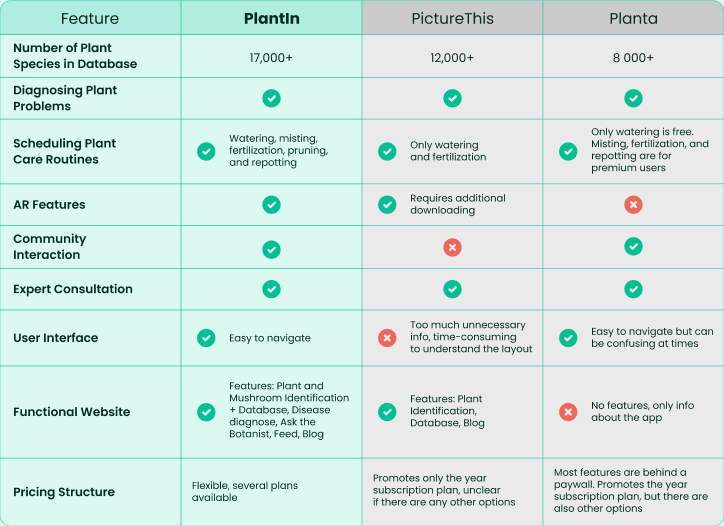
If you’re curious about what features make PlantIn stand out among similar popular apps, here’s a short overview:
When it comes to plant identification features, PlantIn boasts both accuracy and efficiency. Most reported misidentifications were caused by poor image quality or dim light. If you follow the app’s recommendations, the recognition works without hiccups.
Another strength that most PlantIn reviews highlight is the app’s user interface (UI). It’s designed to be as intuitive as possible, even for complete beginners. While other apps may bombard you with complex details or overwhelming features, PlantIn keeps things simple and easily accessible.
The product integrates a wide range of functionalities into a single platform. Here, you can find everything you’ll need for a healthy garden: detailed information on thousands of species, plant health monitoring tools, tailored care plans, and customizable reminders for everyday activities like watering and fertilizing.
As for subscriptions, the app has a transparent pricing structure with flexible plans, including weekly, monthly, and yearly plans. Moreover, the company offers a money back guarantee if you find the experience lacking.
If you’re curious about what features make PlantIn stand out among similar popular apps, here’s a short overview:
Strengths:
Comprehensive Care: Offers in-depth care instructions, diagnosing plant problems, and scheduling plant care routines — features that are limited among competitors.
Expert Support: Access to a team of professional botanists for personalized advice.
User-friendly Interface: Easy to navigate, making it accessible for everyone, no matter their age or tech skills.
Community Engagement: A thriving community of users enhances the experience.
Cross-Platform Availability: Manage your garden, identify plants, engage in community activities, and so much more, both in the app and on PlantIn’s website. All the data is synchronized between devices.
Expert Support: Access to a team of professional botanists for personalized advice.
User-friendly Interface: Easy to navigate, making it accessible for everyone, no matter their age or tech skills.
Community Engagement: A thriving community of users enhances the experience.
Cross-Platform Availability: Manage your garden, identify plants, engage in community activities, and so much more, both in the app and on PlantIn’s website. All the data is synchronized between devices.
Weaknesses:
Limited Offline Features: You can only save pictures to identify them later when there’s an internet connection.
Pricing: Some users find the subscription on the pricier side compared to other apps.
Pricing: Some users find the subscription on the pricier side compared to other apps.
Customer Reviews
What do users really think about PlantIn? Based on reviews from various services, the overall feedback is impressively positive. Many users rave about the app’s flexible customization and the array of helpful features compiled in one product. Other PlantIn app reviews share success stories of how it saved their plants and praise the botanists’ advice. Based on feedback from the App Store and Google Play:
Most users report improved plant health after following PlantIn’s recommendations.
The app has an average rating of 4.8 stars across 100,000+ reviews, indicating high customer satisfaction.
Most users report improved plant health after following PlantIn’s recommendations.
The app has an average rating of 4.8 stars across 100,000+ reviews, indicating high customer satisfaction.
What users love:
“It managed to identify all my plants and provided a care routine for each of them! It’s exactly the app I was looking for. Thank you” — JamesHetliedly_
“The best app there is for home gardening! It helps me arrange my plants and never forget to take care of them. Information in the app is super relevant and detailed. I was even able to report my plant using the guidance! It is also cool that they set care reminders automatically so that I should not worry about it and just add plants. They even have a quiz in the app where you can guess plants by pictures!! LOL, I have never seen such a thing in this type of app” — Golem765
“The best app there is for home gardening! It helps me arrange my plants and never forget to take care of them. Information in the app is super relevant and detailed. I was even able to report my plant using the guidance! It is also cool that they set care reminders automatically so that I should not worry about it and just add plants. They even have a quiz in the app where you can guess plants by pictures!! LOL, I have never seen such a thing in this type of app” — Golem765
On the other hand, some myplantin.com reviews have reported overly generalized plant health assessments and a few misidentifications from time to time. Of course, there are always places for improvement; thus, the PlantIn team thoroughly analyzes their customers’ feedback and updates the product. For example, the disease diagnosis feature has already been updated to provide more accurate and detailed results. The same goes for the plant identification feature; the app’s ML model is constantly evolving, improving the accuracy.
Does the PlantIn app work as advertised? Most reviews come to the conclusion that it really does. So much so that they feel like the app is worth the investment and opt for premium plans.
Does the PlantIn app work as advertised? Most reviews come to the conclusion that it really does. So much so that they feel like the app is worth the investment and opt for premium plans.
User Experience
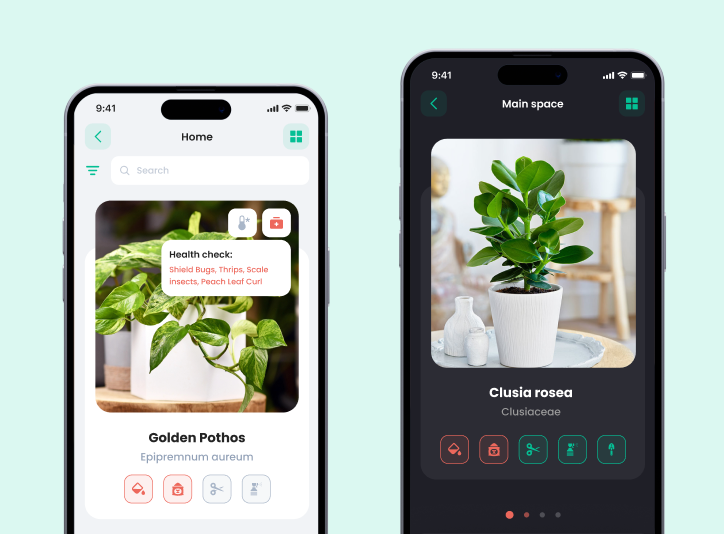
In terms of user experience, PlantIn sets a high standard. Its user interface is clean and intuitive, making it easy to navigate between all the features. You may think that such a feature-rich app would have a convoluted, sophisticated design, but in reality, everything is minimalistic, responsive, and well-structured. A great example of this is the plants’ profiles. As we have mentioned, the background information on plants is robust, so the designers came up with a little trick. All the data is provided in clear, digestible chunks hidden behind corresponding dropdowns. This way, you don’t have to stare at a wall of text, unsure where to find what you’re looking for. The use of visual elements also helps simplify the care instructions, making complex tasks more straightforward to understand at a glance.
Localization is also PlantIn’s strong point. At the moment, the app features 20 languages, and it seems more are on the way. This multilingual support ensures users can enjoy a seamless experience regardless of their location.
Another point to mention is the cross-platform synchronization. Whether you’re using the app on Apple devices, Android, or the web version, your data is synced in real-time across all platforms. This means you can take a picture of a plant with your phone and view care instructions later on your desktop without any hassle. Switching between devices feels effortless, making it convenient for users who rely on multiple gadgets throughout their day.
PlantIn operates without any noticeable delays, whether you’re identifying a plant, setting reminders, or browsing care tips. Regular updates improve the speed and introduce new or improve already existing features. Moreover, the development team promptly addresses any reported bugs to ensure a seamless experience.
Localization is also PlantIn’s strong point. At the moment, the app features 20 languages, and it seems more are on the way. This multilingual support ensures users can enjoy a seamless experience regardless of their location.
Another point to mention is the cross-platform synchronization. Whether you’re using the app on Apple devices, Android, or the web version, your data is synced in real-time across all platforms. This means you can take a picture of a plant with your phone and view care instructions later on your desktop without any hassle. Switching between devices feels effortless, making it convenient for users who rely on multiple gadgets throughout their day.
PlantIn operates without any noticeable delays, whether you’re identifying a plant, setting reminders, or browsing care tips. Regular updates improve the speed and introduce new or improve already existing features. Moreover, the development team promptly addresses any reported bugs to ensure a seamless experience.
Premium Features
We’ve already mentioned flexible pricing, so the next logical question is: How much are we talking about? While you can download the app for free on your iPhone or Android device, it’s the premium plan that unlocks everything this app is capable of.
Subscription options:
Weekly Plan: $7.99/week.
Monthly Plan: $9.99/month.
Yearly Plan: $19.99/year (saves you over 50% compared to the weekly plan).
PlantIn Lifetime Subscription: $59.99 one-time payment.
Season Pass: $22.99.
After seeing the prices, you might be wondering, is the PlantIn app worth it? To answer this question, we need to understand what the premium subscription plans offer:
Unlimited Plant Identification: Identify any plant, anywhere, with no limits.
Unlimited Disease Diagnosis: Get insights into your greenery’s health as often as you need.
Advanced Plant Care Tips: Get access to in-depth guides and expert advice tailored to your plants.
Ad-Free Experience: Enjoy the app without any interruptions.
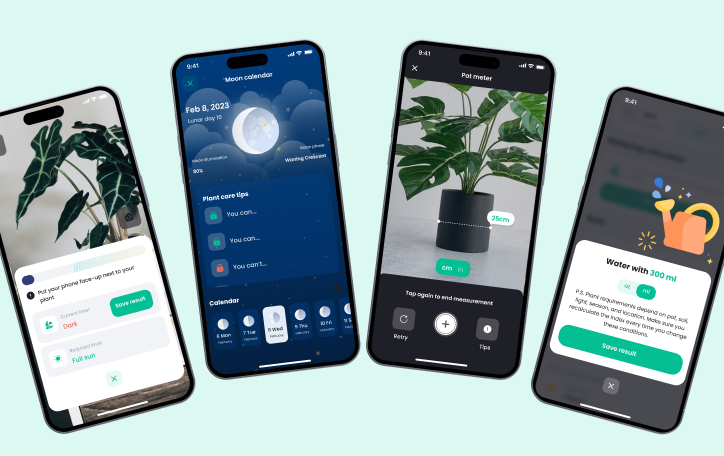
Exclusive Tools: Utilize advanced features like the Light Meter and Water Calculator.
Endless Plant Spaces: Add as many plants as you like without any restrictions.
Unlike most competitors, PlantIn doesn’t pressure you into jumping into lifetime premium access right away. Moreover, they offer a 3-day trial period to check out all the features and decide whether you need all of them or not. While the premium tools come at a cost, the value they provide cannot be overstated, especially for serious gardeners. If you have an extensive collection of plants or need detailed expert advice, PlantIn Premium is definitely worth diving into. But if you only need care reminders, by all means, the free option will more than suffice.
Subscription options:
Weekly Plan: $7.99/week.
Monthly Plan: $9.99/month.
Yearly Plan: $19.99/year (saves you over 50% compared to the weekly plan).
PlantIn Lifetime Subscription: $59.99 one-time payment.
Season Pass: $22.99.
After seeing the prices, you might be wondering, is the PlantIn app worth it? To answer this question, we need to understand what the premium subscription plans offer:
Unlimited Plant Identification: Identify any plant, anywhere, with no limits.
Unlimited Disease Diagnosis: Get insights into your greenery’s health as often as you need.
Advanced Plant Care Tips: Get access to in-depth guides and expert advice tailored to your plants.
Ad-Free Experience: Enjoy the app without any interruptions.
Exclusive Tools: Utilize advanced features like the Light Meter and Water Calculator.
Endless Plant Spaces: Add as many plants as you like without any restrictions.
Unlike most competitors, PlantIn doesn’t pressure you into jumping into lifetime premium access right away. Moreover, they offer a 3-day trial period to check out all the features and decide whether you need all of them or not. While the premium tools come at a cost, the value they provide cannot be overstated, especially for serious gardeners. If you have an extensive collection of plants or need detailed expert advice, PlantIn Premium is definitely worth diving into. But if you only need care reminders, by all means, the free option will more than suffice.
Conclusion
Now that we’ve reached the end of this review, it’s time for a final verdict. Is PlantIn a good app or just another missed opportunity? After thoroughly exploring the app’s features and functionality, it’s clear that it offers more than simple plant identification. It has proven to be a reliable, all-in-one solution for your garden.
Its user-friendly design, backed by advanced technology, helps plant parents maintain the health and well-being of their greenery. Whether you’re trying to identify a new species or need reminders for watering, the app covers it all and even more. So, if you’re someone who loves nature or wants to improve your green thumb, PlantIn is a must-try.
Finally, what’s behind such success? The team at PlantIn isn’t just developers and tech experts; they are real plant lovers — just like you! With a deep dedication to both technology and nature, they continually work on improving the app, making sure it serves as an effective and reliable tool. So, if you want to join a like-minded community of Plant Heroes, PlantIn is just the thing you’re looking for! 🌿
Its user-friendly design, backed by advanced technology, helps plant parents maintain the health and well-being of their greenery. Whether you’re trying to identify a new species or need reminders for watering, the app covers it all and even more. So, if you’re someone who loves nature or wants to improve your green thumb, PlantIn is a must-try.
Finally, what’s behind such success? The team at PlantIn isn’t just developers and tech experts; they are real plant lovers — just like you! With a deep dedication to both technology and nature, they continually work on improving the app, making sure it serves as an effective and reliable tool. So, if you want to join a like-minded community of Plant Heroes, PlantIn is just the thing you’re looking for! 🌿
2025 © All rights reserved. By continuing, you agree to our Terms & Conditions Privacy Policy Subscription Policy
Also, you agree to our use of Meta Pixel
Also, you agree to our use of Meta Pixel